
Stream Management

New · plug-in library for SEFAS HCS

Modern tables in your SEFAS HCS documents

The Stream Charts approach, applied to the tables in your documents: summary tables composed by the HCS engine, designed in HC Designer.

PDF, 17 pages, 4.3 MB · Stream Charts and Stream Tables
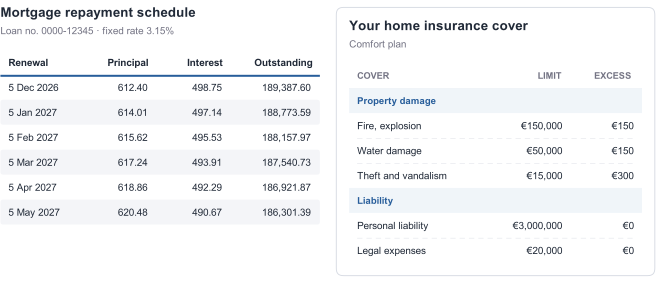
Two demo tables: loan schedule (Striped template) and home insurance cover (Card template)
Striped and Card templates, composed by the HCS engine · fictitious data

Before / after

Same data, a completely different table

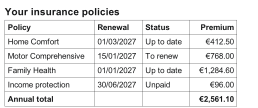
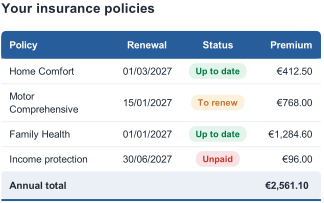
Same width, same HCS engine. Left: a native HCS table (Arial, black rules). Right: Stream Tables.

Insurance policies

Before · native HCS table
Insurance policies: Before · native HCS table
Black grid on every cell; status as plain text.
After · Stream Tables
Insurance policies: After · Stream Tables
Header in your brand colour, status badges, highlighted total.

Gallery

Tables you can read at a glance

  • Banner: insurance policies with status badges and annual total
    Banner · insurance policies with status badges and annual total
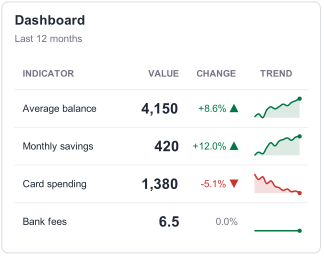
  • Indicators: key figures, change with arrows and 12-month sparkline
    Indicators · key figures, change with arrows and 12-month sparkline
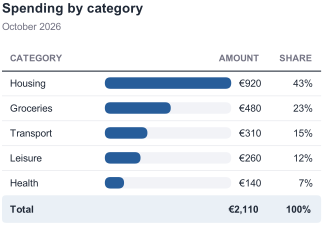
  • Data bars: spending by category, one bar per amount
    Data bars · spending by category, one bar per amount
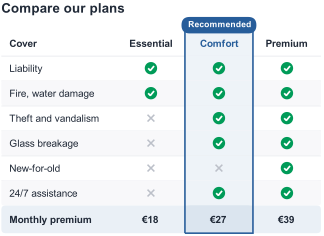
  • Comparison: ticks and crosses, recommended column highlighted
    Comparison · ticks and crosses, recommended column highlighted

Tables composed by the HCS engine · fictitious data

What Stream Tables changes

  • Readable at a glance

    Status badges, data bars, sparklines, trend arrows, ticks.

  • On brand

    Eight design templates, your brand colour, the Stream Charts palettes.

  • In HC Designer

    A component of the same HCS library as Stream Charts, fed by your data.

The eight templates

  • Clean · thin rules, discreet small-caps header
  • Banner · solid header in your brand colour, rounded corners
  • Striped · alternating rows without rules, for schedules
  • Card · rounded frame, built-in title, sections and dotted separators
  • Statement · debits in red, credits in green, opening and closing balances
  • Indicators · highlighted value, trend and sparkline
  • Data bars · a proportional bar next to each value
  • Comparison · plans side by side, ticks and recommended column

In HC Designer

A table is set up in a few tabs

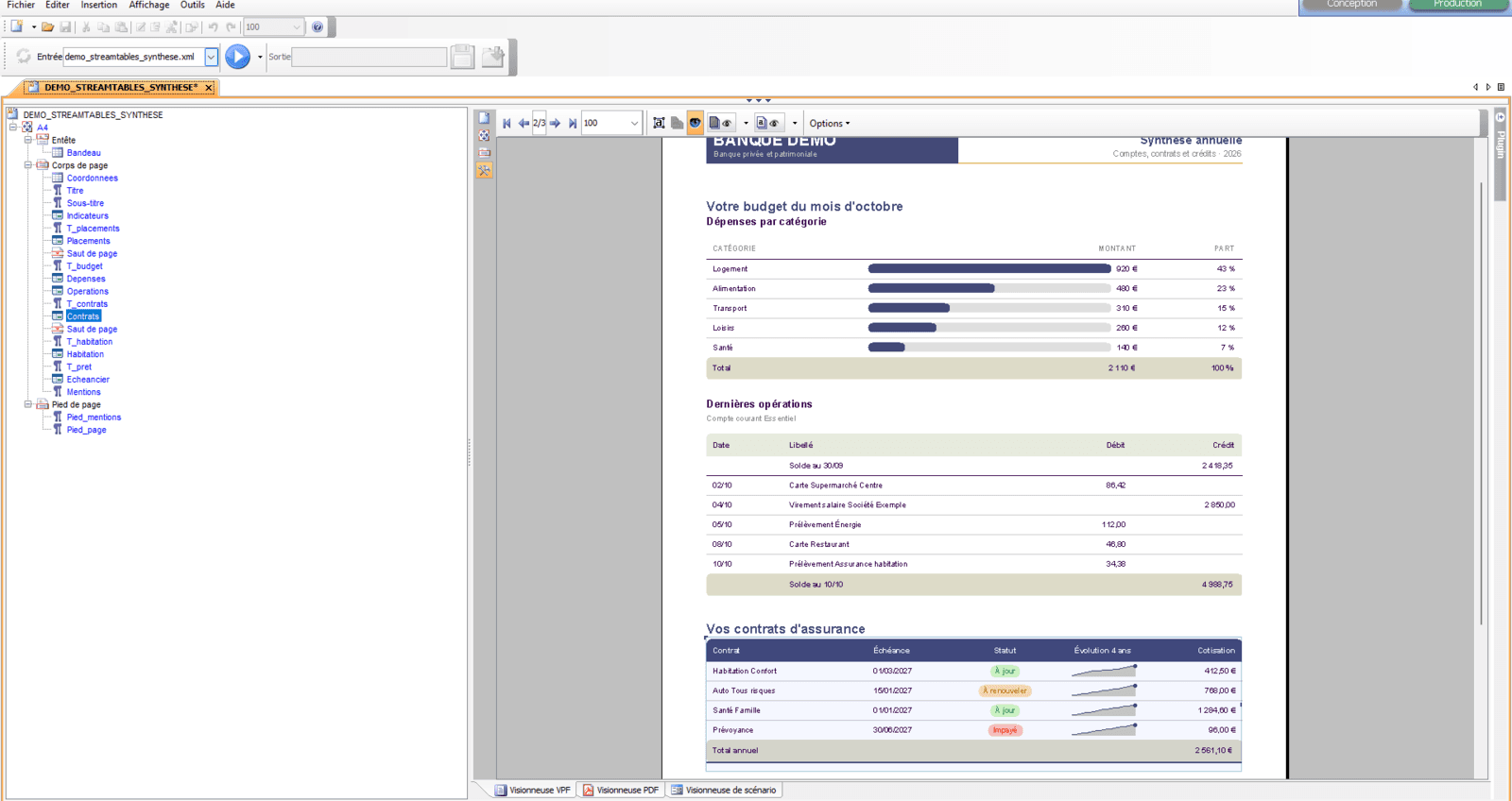
HC Designer: demo template tree and preview of the tables composed by the HCS engine
Demo template tree: each table is a Stream Tables component, next to the preview composed by the HCS engine. (French-language Designer)
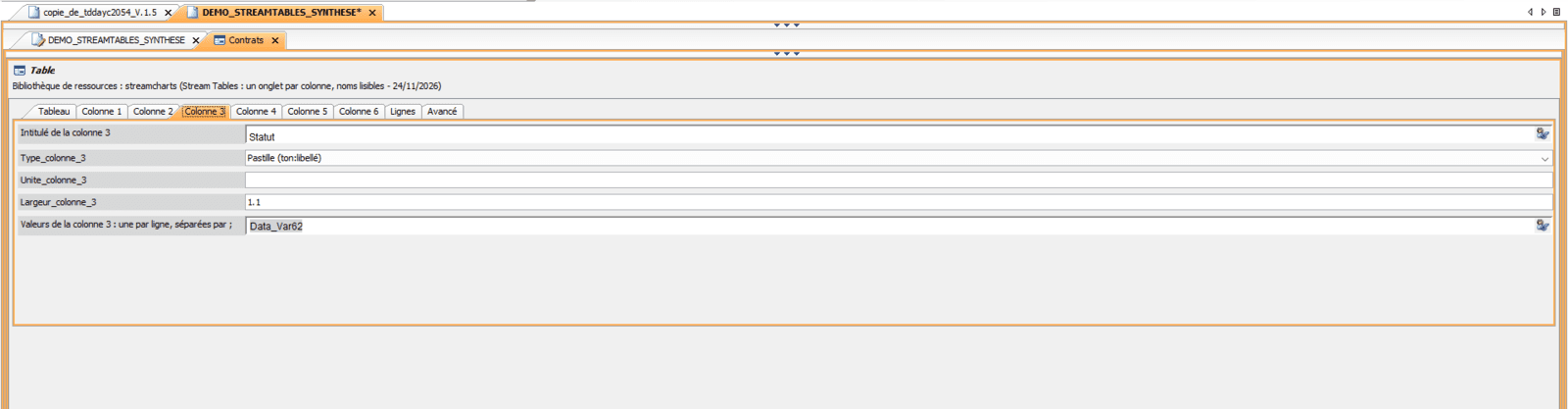
HC Designer: Stream Tables component panel, one tab per column
The component panel: one tab per column (header, type, unit, width, values from your data streams). (French-language Designer)
  • Same library · the “Table” component sits next to “Chart”, in the Stream Charts library you have already imported.
  • One tab per column · header, type from a list (text, amount, badge, sparkline, tick…), unit, width and values.
  • Your data · typed values or variables from your data streams, one value per row; totals and sections in one setting.
  • Advanced cases · JSON configuration: tables side by side, highlighted column, fine-tuning.

View a demo document (PDF, 3 pages)Annual review from a fictitious bank: all eight templates, composed by HCS.

Demo

Book a demo

Thirty minutes by video call, on our demo documents, no commitment. Give us two slots that suit you: we confirm the appointment by email.

Download the brochure (PDF)

30-minute video call. Choose a date and a half-day (Paris time).

Preferred slot 1 *
Preferred slot 2 (optional)

* Required fields

We confirm the slot by email within 24 business hours.

Need extra hands on your HC Designer templates?

Our document composition developers and designers join your teams, on a time-and-materials or fixed-price basis: new and redesigned templates, migrations, maintenance.

Staff augmentation